TABLE OF CONTENTS
- What is Demand Profiling?
- Key Demand Profile Types
- Why Does Demand Profiling Matter to Me as a Planner?
- Where Do I See Demand Profile Results?
- What Should I Watch Out For?
- ? Recommended Planner Actions
What is Demand Profiling?
Demand Profiling analyzes your product's historical demand patterns to help the system choose the best forecasting approach for each item. It answers the question: "How does this product behave over time?"
Key Demand Profile Types
Each profile is determined by two statistical measures:
- ADI (Average Demand Interval) — how regularly demand occurs over time
- CV² (Coefficient of Variation Squared) — how much demand quantity varies
Smooth (ADI < 1.32, CV² < 0.49) . The demand is regular in both timing and quantity. Highest forecastability. Standard statistical models perform well with minimal planner intervention needed.
Intermittent (ADI ≥ 1.32, CV² < 0.49). The demand occurs infrequently, but when it does, quantities are relatively consistent. Gaps between orders are the main challenge.
Erratic (ADI < 1.32, CV² ≥ 0.49). The demand occurs regularly over time, but with large quantity swings. Timing is predictable; volume is not. Manual overrides or promotional adjustments are often needed.
Lumpy (ADI ≥ 1.32, CV² ≥ 0.49). Both timing and quantity are highly variable. The hardest profile to forecast. Carries the highest inventory risk and requires the closest planner attention each cycle.
Why Does Demand Profiling Matter to Me as a Planner?
- It determines which forecast model the system applies to each product
- It influences safety stock and inventory policy recommendations
- It helps you prioritize override effort — Smooth items rarely need manual intervention; Erratic or Lumpy items often do
- It feeds directly into Segmentation (XYZ classification is closely related to the demand profile)
Where Do I See Demand Profile Results?
To access Demand Profiling, navigate to the Segmentation Dashboard and click on the dropdown menu.
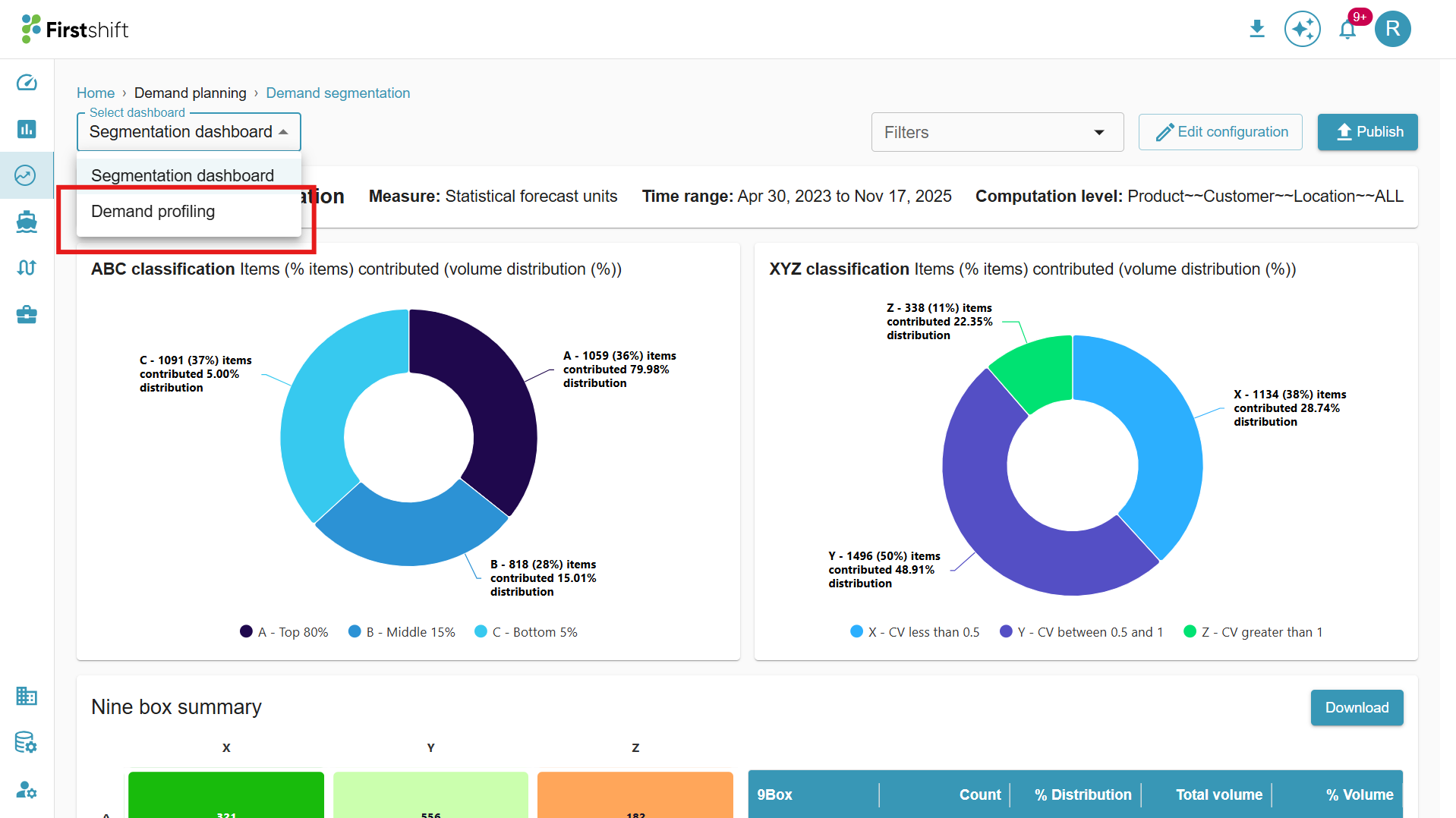
Clicking the Segmentation Dashboard name opens a dropdown menu. From this menu, select Demand Profiling to access and analyze the segmentation results.
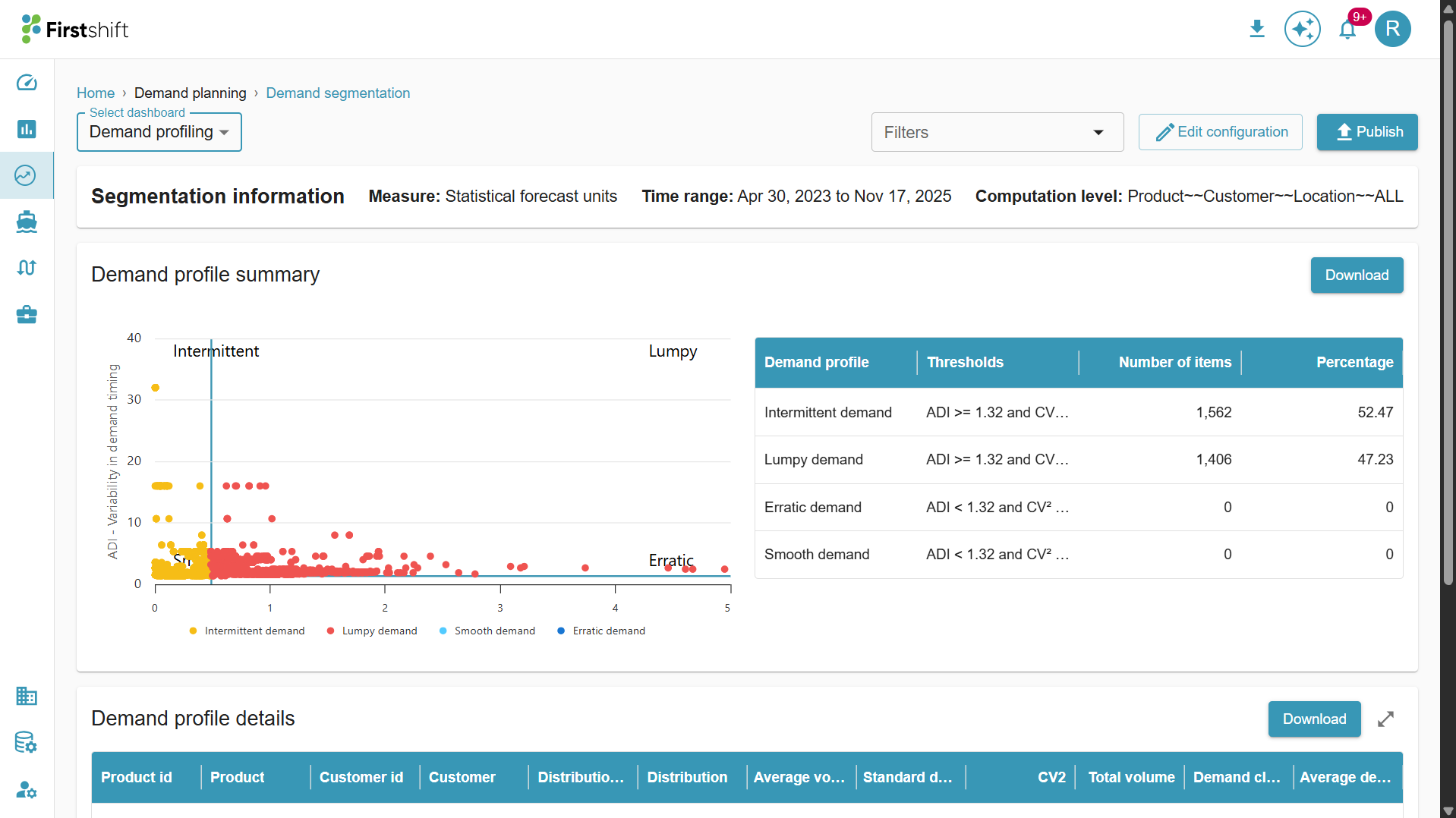
The demand profiling results can be accessed in two tables.
Summary Table: The summary table displays the number of products classified under four demand profiles. This provides a quick overview of how products are distributed based on their demand patterns.
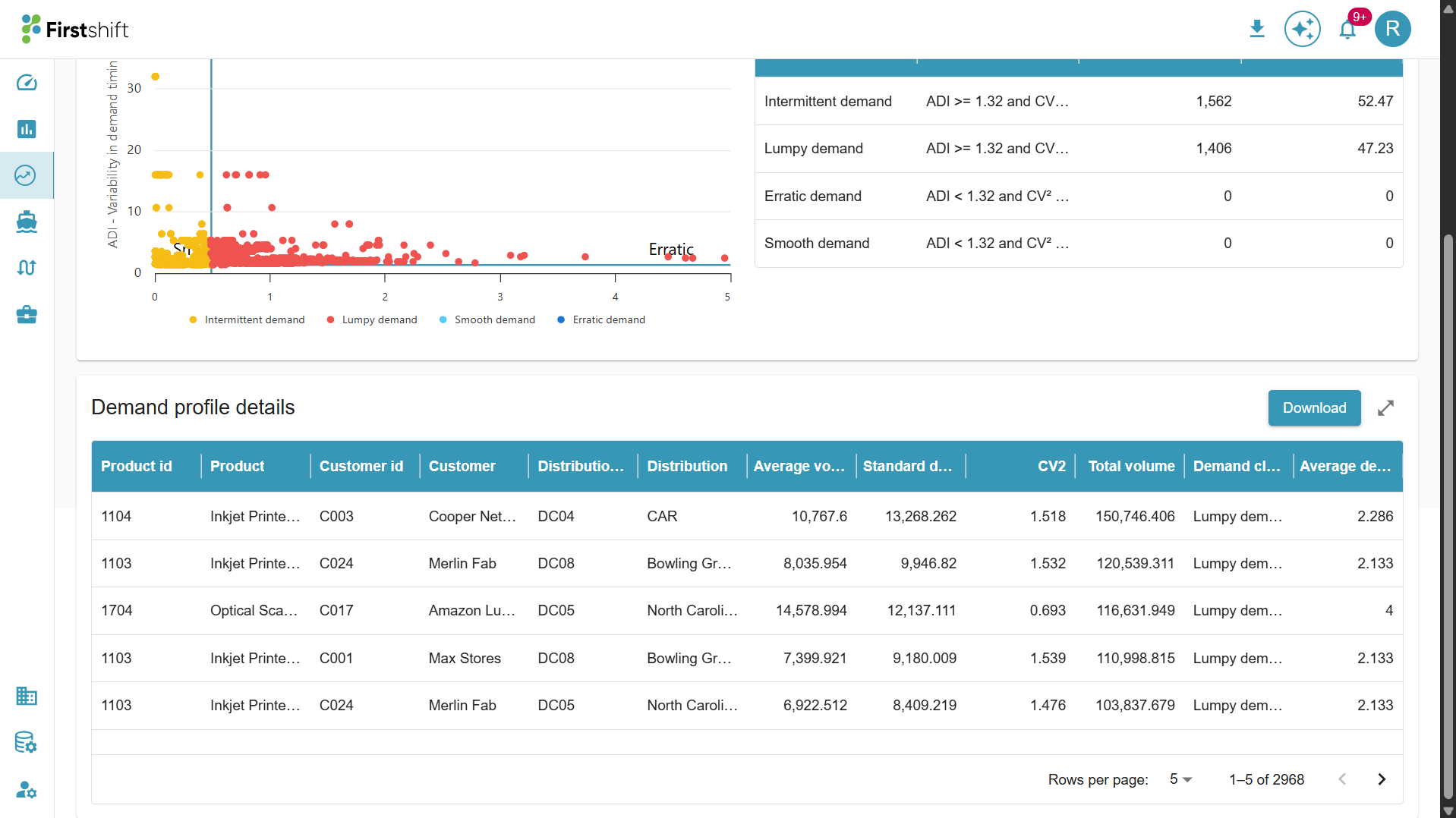
Demand profile details table: The details table will provide the following information.
Average Volume – The average number of units sold over a specific period.
Standard Deviation – Measures the variability in demand. A higher standard deviation indicates more fluctuation in demand.
CV2 (Coefficient of Variation Squared) – A statistical measure used to classify demand patterns. It helps determine whether a product has stable or unstable demand.
Total Volume – The total number of units sold during the analyzed period.
Demand Classification – The type of demand pattern the product follows. In this case, all products listed are classified as Intermittent demand, meaning demand occurs irregularly with varying intervals between orders.
What Should I Watch Out For?
- Profile shifts: A product moving from Smooth to Erratic signals a real change in market behavior. Review the forecast and safety stock for that item immediately.
- Lumpy or Intermittent items with high MAPE: The system may still struggle even with specialized models. Consider a manual override or a promotional adjustment.
- New products may be classified as New until sufficient history is available. Treat their forecasts as directional only.
- Stale profiling: If demand profiling has not been rerun after a significant market event (e.g., a product launch or supply disruption), classifications may no longer reflect the current reality.
? Recommended Planner Actions
- Review Erratic and Lumpy items in your portfolio each planning cycle. These carry the highest forecast risk
- Do not override Smooth items without a clear business reason. The model is likely performing well
- Flag New items for a manual baseline until the system has at least 6 months of history
- Escalate profile shifts to your planning admin so the forecast engine can be re-run with updated classifications
Was this article helpful?
That’s Great!
Thank you for your feedback
Sorry! We couldn't be helpful
Thank you for your feedback
Feedback sent
We appreciate your effort and will try to fix the article