TABLE OF CONTENTS
Overview
The Solver Engine automatically identifies gaps or inconsistencies in the Master data (such as Product Location and Product Sourcing Network) and records them in a structured Data Exceptions table. These exceptions help you understand why proposed orders were not generated or were generated with warnings, enabling you to take corrective action before the next planning run.
The Data Exceptions feature is designed to:
- Detect missing or incorrect data required by the solver to generate proposed orders.
- Provide visibility into why proposed orders were not generated.
Access the data exceptions.
Step 1: Go to the proposed orders page
Step 2: Click the “Data exceptions” button.
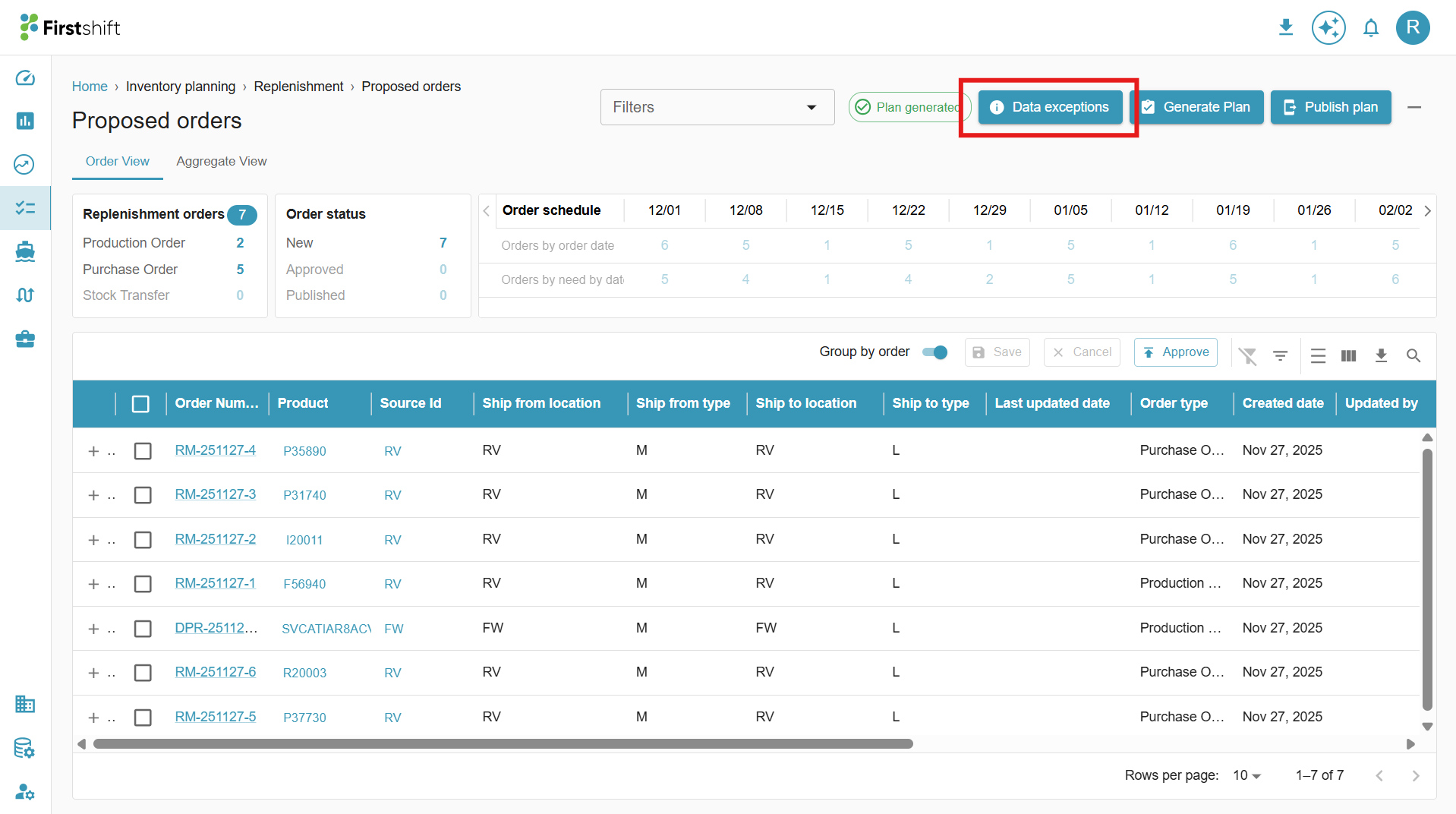
The data exceptions page will display errors and warnings.
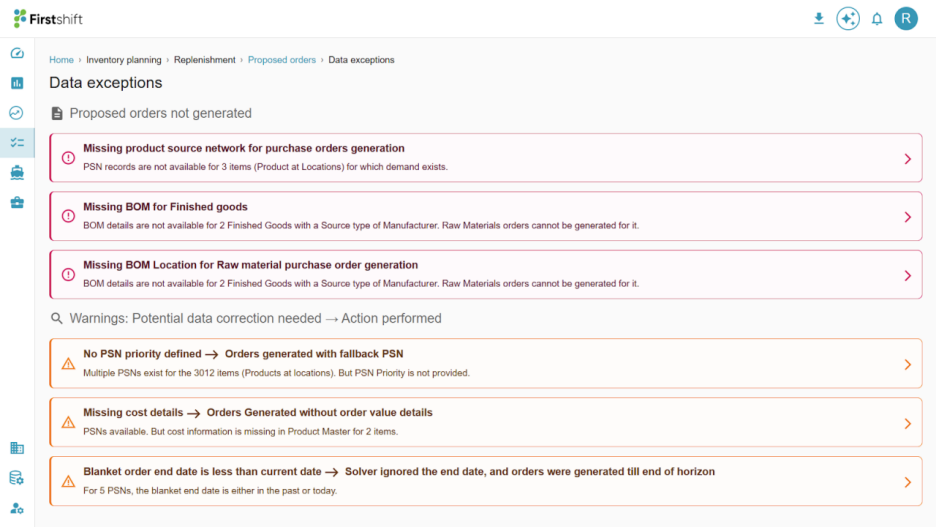
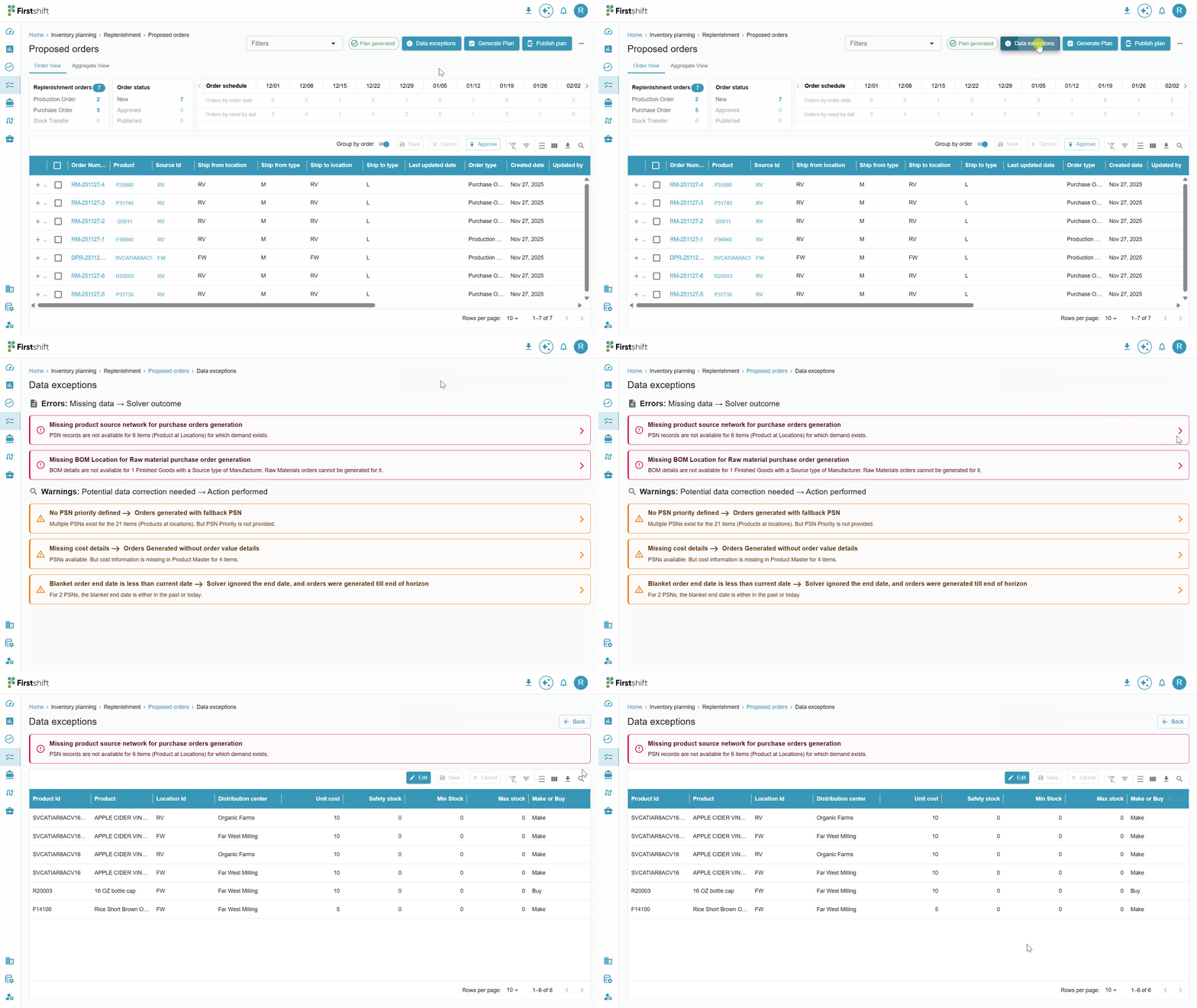
You can see the details by clicking the arrow next to each error and warning.
Check the illustration below.
Errors
Errors indicate missing master data records that prevented the replenishment engine from generating Proposed Orders. The following are the error scenarios
- Missing Product Sourcing Network
- Missing Bill of Materials (BOM) for Finished Goods
1 : Missing Product Sourcing Network (PSN)
For every Product–Location combination with demand, at least one Product Sourcing Network (PSN) record must exist in the system. PSN defines how the product will be replenished — either through procurement or internal transfer.
If no PSN exists for a demanded Product–Location combination:
- The application cannot generate proposed orders
- This scenario is treated as a Data Exception error, as the replenishment solver does not have sourcing information to proceed.
In summary, at least 1 PSN record is required for each Product–Location combination that needs replenishment.
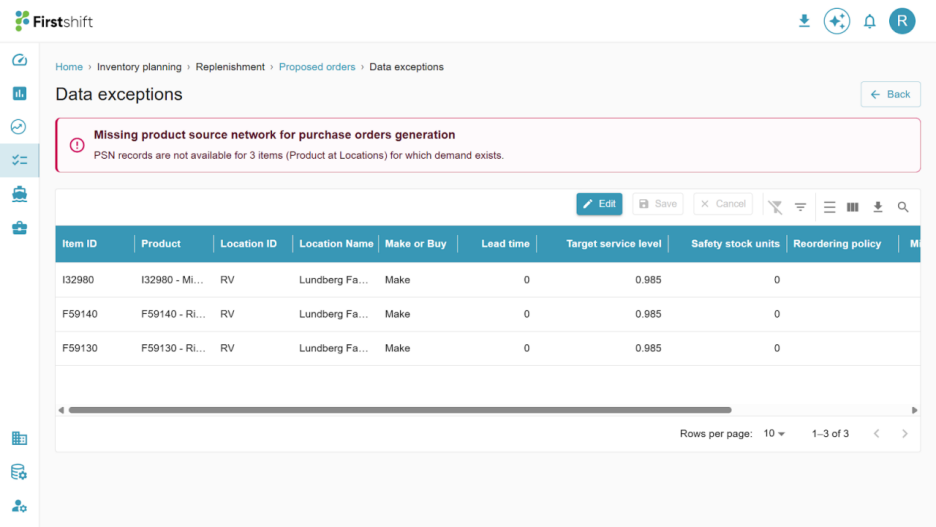
In the screenshot above, the exception shows that PSN records are missing for three product–location combinations where demand is present. Because demand exists, but no sourcing information is available, the solver cannot generate the corresponding proposed purchase orders.
To resolve this error, you must create or update the Product Sourcing Network (PSN) records for the Product-Location combinations listed in the exception. Each impacted product–location combination requires a valid PSN entry so the solver can determine the correct sourcing path and generate the appropriate purchase orders.
Once the PSN records are added, rerun the solver to generate the missing proposed orders.
2: Missing Bill of Materials (BOM) for Finished Goods.
If the application does not contain Bill of Material (BOM) details for the finished good, it can only create a proposed order for the finished good when demand exists. It cannot create proposed orders for raw materials because there is a misalignment due to missing BOM details.
Replenishment solver configuration for Raw Material Planning
Configuration scenario | BOM details required? | Proposed Orders created for |
Solver is ON for raw material procurement | ✔ Yes | Both Finished Goods and Raw Materials |
Solver is ON for raw material procurement, but the BOM is missing | ✔ Yes | Finished Goods only |
Solver is OFF for raw material procurement | ✘ No | Finished Goods only |
Impact of Missing BOM Details
If BOM details are missing for a finished good while raw material replenishment is enabled:
- The system can generate proposed orders for finished goods
- The system cannot generate proposed orders for raw materials
The Data Exception screen lists the Products (Finished Goods) for which the Bill of Materials (BOM) is missing.
The screenshot below shows a Missing BOM for Finished Goods.
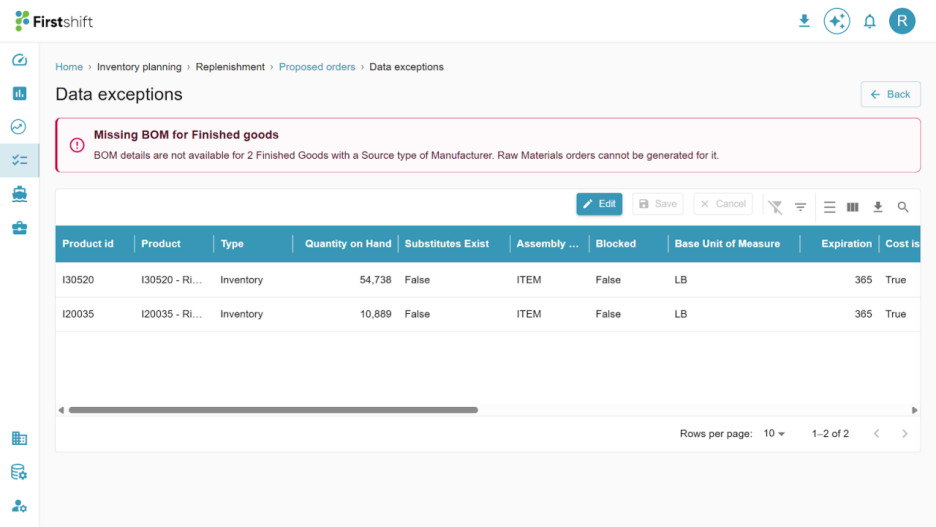
In this case, BOM details are not available for two finished goods, even though they are configured to be manufactured in the PSN. Because the solver cannot determine which raw materials are required, it cannot generate the necessary raw material purchase orders or production recommendations.
To resolve this Error, you must create or update the BOM records for the finished goods displayed in the exception.
Once the BOM details are added, rerun the solver to generate the appropriate raw material orders.
3: Missing BOM Location for raw material purchase orders
In addition to the BOM Master, BOM Location data is required for generating proposed purchase orders for raw materials. This ensures that the replenishment solver correctly interprets the Bill of Materials based on where the finished good is being manufactured.
Why is the BOM Location needed
- The same Finished Good may have different BOM structures at different manufacturing locations
- Raw material requirements may vary by location due to:
- Local production processes
- Alternate components
- Different quantity ratios
Therefore, the BOM must be defined for each Product–Location combination in which the Finished Good is produced.
Impact of missing BOM Location data
If BOM Location details are missing:
- The solver cannot explode the BOM at that specific location
- Proposed Purchase Orders for raw materials cannot be generated
- This scenario is treated as a critical error
The screenshot below shows that the BOM at the Location is missing for product-location combinations.
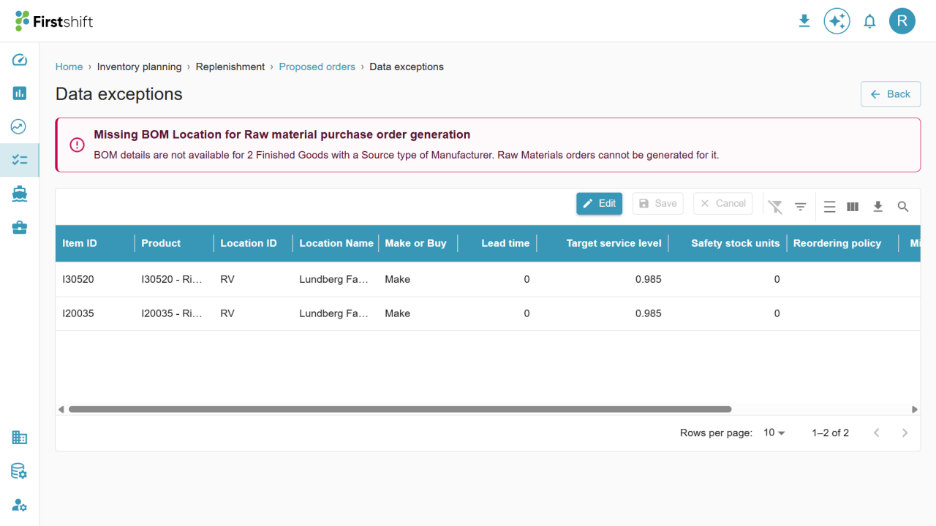
In this case, the system indicates that BOM location details are missing for two finished goods. As a result, the solver cannot determine where the components will be consumed and, therefore, cannot generate raw material purchase orders.
To resolve this Error, you must assign the BOM to the correct manufacturing location for the finished goods listed in the exception.
Warnings
Warnings indicate that the solver generated Proposed Orders, but some data corrections are needed for complete accuracy or optimal results.
The solver may use fallback logic or default values when required data is missing or incomplete.
Examples of warnings include:
- No PSN priority defined.
- No preferred supplier defined
- Missing cost details
1: No PSN Priority Defined
When a Product–Location combination has multiple Product Sourcing Networks (PSNs) associated with it, the system must define a PSN priority to determine which supplier is selected first when generating purchase order recommendations.
If no PSN priority is defined:
- The application defaults to selecting any available PSN — usually the first one in the list.
- This can result in inaccurate and unintended procurement recommendations.
- Planners may lose control over which supplier should be preferred for sourcing that item.
Why is PSN priority required
When multiple PSNs exist, it represents multiple supplier options for the same product. Planners often have explicit preferences based on:
- Commercial terms (best pricing, lead time, reliability, etc.)
- Service level expectations
- Strategic supplier relationships
For example:
- Source A should be the primary choice while procuring Product X.
- Source B should be considered only when Source A cannot fulfill the requirement.
- Source C may be a backup option with the lowest priority.
Without such prioritization logic, the solver could pick Source B or C accidentally, leading to:
- Higher cost procurement
- Longer lead times
- Violation of the planner’s sourcing strategy
PSN Priority applies to both Internal Transfers (i.e., DC to DC) and Purchase Orders (Supplier to DC)
The screenshot below shows the example for the ‘No PSN Priority defined’ warning
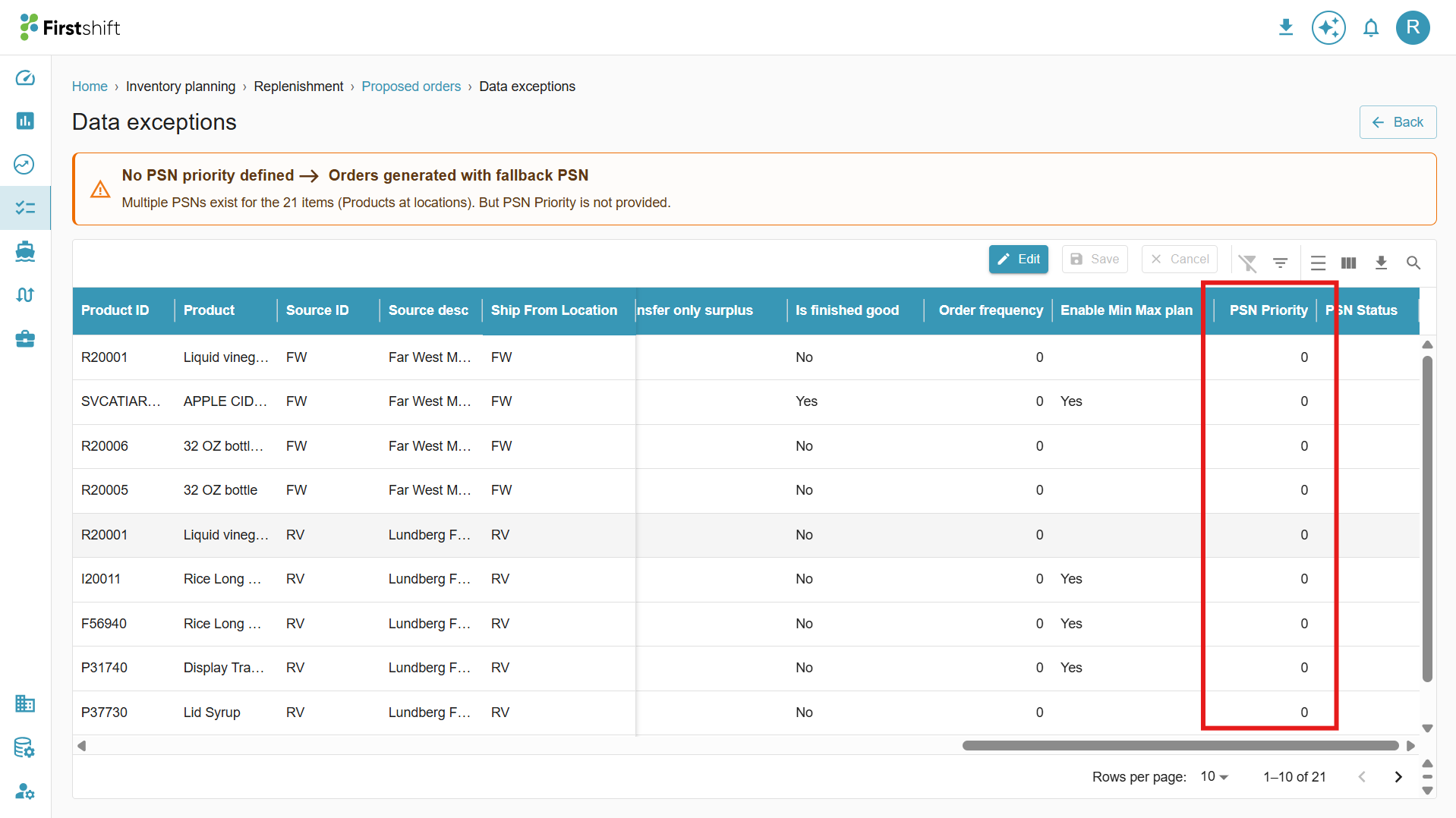
In this case, the system has identified multiple Product-Location combinations with multiple PSNs, but no PSN priority was defined. Since the solver could not determine the preferred sourcing path, it automatically selected a fallback PSN.
In the example shown above, the PSN Priority is displayed as zero, indicating that no priority has been configured.
2: No Preferred Supplier Defined
For externally procured products, a supplier can be a Vendor or a Contract Manufacturer.
When multiple suppliers are associated with the same Product–Location combination, the PSN Priority should define the sourcing sequence. However, if PSN Priority is not defined, the system falls back to the Preferred Supplier setting. However, if the Preferred Supplier is also not specified, the application generates a warning and creates a Purchase Order with fallback logic.
How the replenishment engine selects suppliers for purchase orders
The supplier selection flow operates as follows:
Condition | System Behavior | Result |
PSN Priority is defined | Solver uses the highest priority PSN | Accurate PO generation |
PSN Priority not defined → Exactly one supplier is marked Preferred Supplier | Solver selects the preferred supplier | Acceptable sourcing decision |
PSN Priority not defined → Multiple suppliers marked Preferred Supplier | Solver selects any supplier based on demand & supply availability | Could be acceptable, but not guaranteed |
PSN Priority not defined → No Preferred Supplier is defined | Solver picks the first available supplier from the list | High risk of incorrect PO generation |
3: Missing Cost Details
While generating proposed orders, the application checks for cost data in the following sequence:
- Primary Check: Cost information is provided at the Product Sourcing Network (PSN) level. If yes, the solver uses if for computing unit price, line amount, and total order cost
- Fallback Check: If the Unit cost is missing at the PSN level, the system checks whether the cost (unit price) is available at the Product Master level. If available, this Unit cost is used to calculate the order values.
If the Unit Cost field is configured but Unit cost data is missing at both the Product Sourcing Network and Product Master levels, the solver engine cannot compute the line amount (order line cost) and the total order cost.
This warning message is displayed only when the Unit Cost field is enabled for the tenant in the PSN. If the Unit cost attribute is not configured:
- No warning will be generated
- Order values will remain unavailable
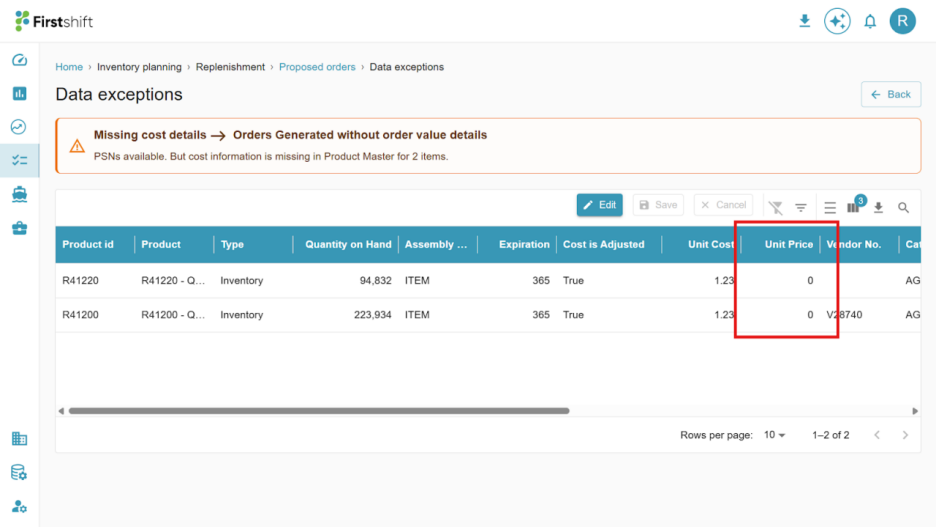
The screenshot below shows that the Unit Price field is enabled in the PSN, but the cost is either 0 or not provided.
4: Blanket order End Date is less than the current date
When a Blanket Order is enabled at a Product Sourcing Network (PSN) (i.e., IS Blanket Order = Yes), the blanket end date determines the validity period for supplier replenishment contracts.
The solver behaves as follows:
Blanket End Date Condition | System Behavior |
End date not provided | Proposed orders are created across the entire planning horizon. |
End date is in the future. | Proposed orders are generated only up to the end date; no orders are created beyond this date |
End date is in the past or equal to the current date | End date is treated as invalid → Solver ignores it and continues creating proposed orders if demand exists |
In summary, a valid future blanket end date prevents orders from being created beyond the contract limit. If the end date is missing or has already expired (past/current date), the solver ignores it and continues generating proposed orders to meet demand.
The screenshot below shows that the Blanket order end date is invalid, as it shows in the past.
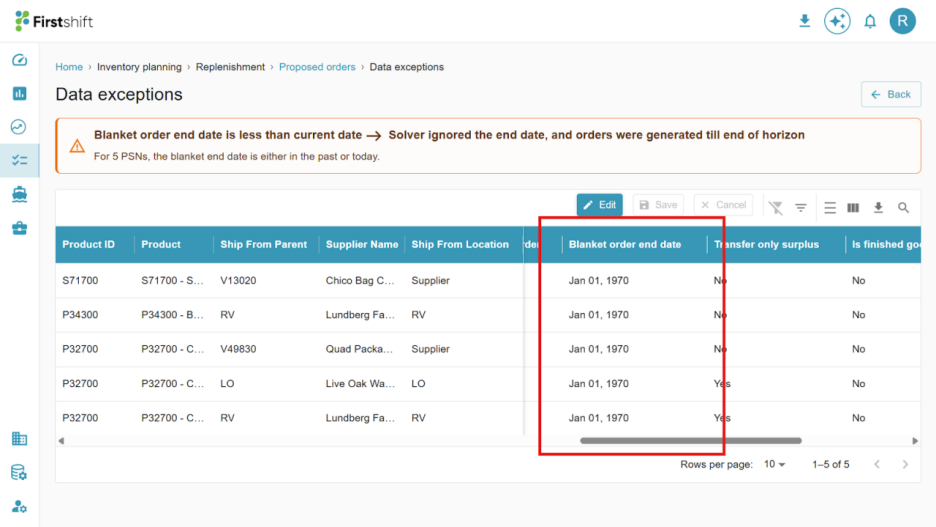
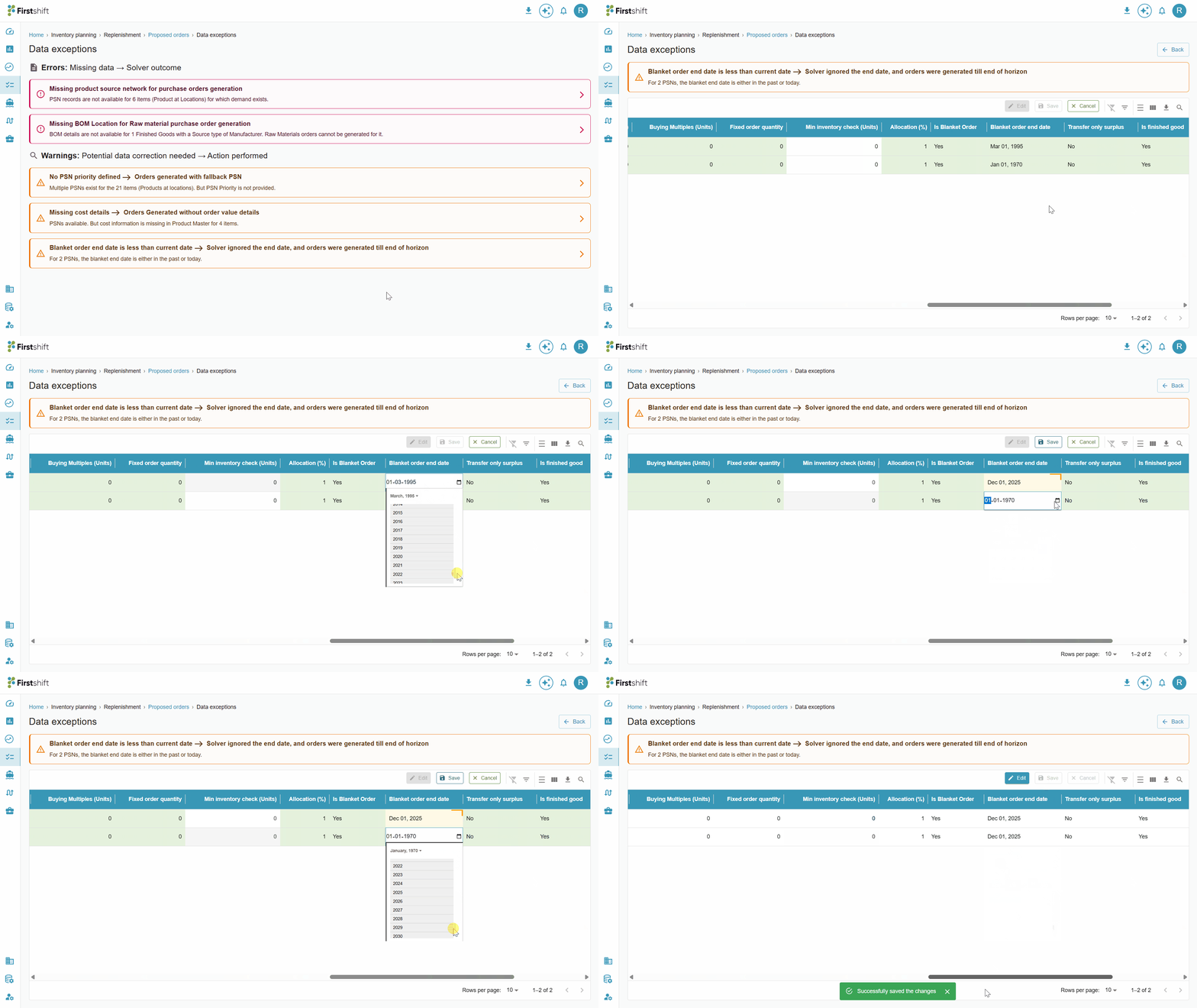
To correct the data, you can edit the record directly from the UI.
Updating data and retriggering the replenishment engine
You can correct the missing or incomplete data by clicking the Edit button on the Data Exceptions page. After making the necessary configuration updates, click Save to apply the changes. Once the updates are successfully saved, rerun the solver to regenerate the proposed orders with the corrected data.
Was this article helpful?
That’s Great!
Thank you for your feedback
Sorry! We couldn't be helpful
Thank you for your feedback
Feedback sent
We appreciate your effort and will try to fix the article