TABLE OF CONTENTS
- Overview
- Where MOV is Configured
- How MOV is Evaluated
- MOV Enforcement Logic
- MOV shortage
- MOV Handling for Product-Level Orders
Overview
Minimum Order Value (MOV) is a sourcing network constraint that ensures every purchase order generated by the replenishment engine meets a minimum monetary threshold.
MOV is evaluated at the order header level, meaning the total value of all products within the same order is considered collectively rather than at the individual order line level.
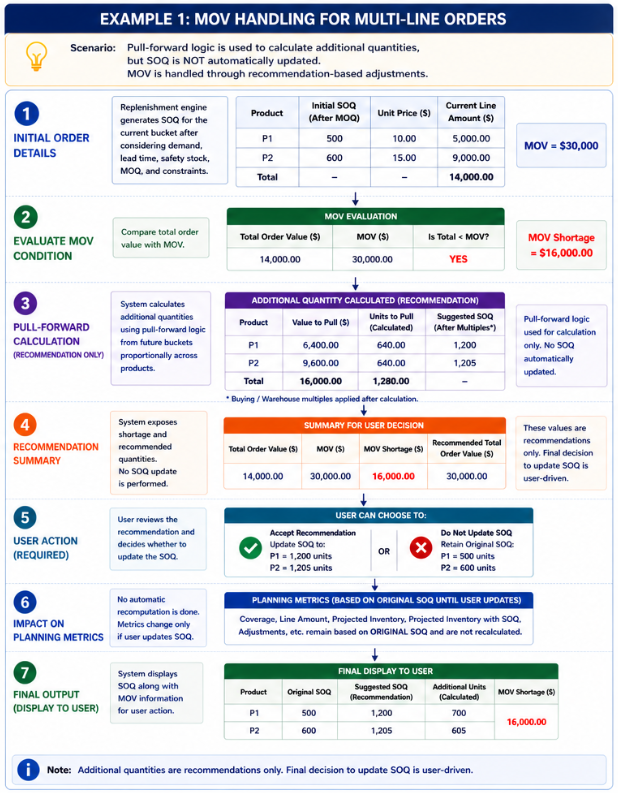
When the total order value falls below the configured MOV, the system uses pull-forward logic to calculate the additional quantity required by leveraging future demand. However, these additional quantities are not automatically applied to the Suggested Order Quantity (SOQ) and are instead exposed for user decision-making.
Where MOV is Configured
MOV is defined as a standard attribute at the sourcing network level, which represents a unique combination of:
Supplier
Ship-from location
Ship-to location
The standard attribute name is: Minimum Order Value
How MOV is Evaluated
For every newly generated order, the replenishment engine calculates the total order value by summing the line-level values across all products in the order:
Total Order Value = Σ (SOQ × Unit Cost)
The system then validates whether the total order value meets or exceeds the configured MOV:
If Total Order Value ≥ MOV, no further action is required
If Total Order Value < MOV, pull-forward logic is applied to close the shortfall
Note: Total Order Cost is also a standard attribute in the system.
MOV Enforcement Logic
After the replenishment engine generates the Suggested Order Quantities (SOQs) for the initial planning bucket—considering lead time demand, safety stock, MOQ, and other constraints—it calculates the total order value across all order lines and checks whether it meets the MOV.
If the MOV is already satisfied, no adjustments are made. If the total order value is below the MOV, the system applies pull-forward logic.
The engine starts with the immediate next bucket (N+1) and progresses sequentially
Demand is pulled proportionally across all products within the order
Each bucket is fully consumed before moving to the next
This process continues until the MOV is satisfied
The application does not automatically adjust or update the SOQ to meet the MOV. Instead, it calculates and exposes the additional units and corresponding values required to bridge the shortfall, enabling you to make informed decisions and manually update the order quantities as needed.
Key Points
MOV is evaluated at the order header level
No action is taken when the total order value ≥ MOV
When the total order value < MOV:
The application calculates the MOV shortage value
Additional units required are computed using pull-forward logic
SOQ remains unchanged and is not automatically updated by the system
Additional quantities are exposed as informational and decision-support fields
You are responsible for manually updating SOQ if they choose to meet the MOV
This approach ensures greater transparency and user control in replenishment planning
Proportional Allocation Rule
The quantity pulled from future buckets for each product is determined using a shortfall factor:
Shortfall Factor = (MOV – Current Total Order Value) / MOV
The system then calculates the proportional pull for each product as follows:
Proportionality Ratio (P) = (Total value available for product P) ÷ (Total value available across all products)
Value to Pull (P) = Proportionality Ratio × Shortfall
Units to Pull (P) = Value to Pull ÷ Unit Price of product P
MOV shortage
The application separates the calculation of additional units required to meet MOV from the actual Suggested Order Quantity (SOQ), providing visibility into the shortfall while allowing users to make informed decisions on whether to act on it.
To support this behavior, new data fields are introduced at both the header and order line levels to clearly present the MOV requirement, shortage, and required adjustments. These enhancements ensure that you have full visibility into how MOV impacts their orders without forcing automatic changes to planned quantities.
Additionally, the application continues to use pull-forward logic to calculate the required adjustments; however, these calculations are used only for recommendation purposes and are not directly applied to SOQ. The responsibility to act on these recommendations lies with the user, who can manually adjust the order quantities based on business needs.
The updated design also removes the need to rerun the SOQ calculation after MOV adjustments and ensures that planning metrics such as coverage are based only on the original SOQ, maintaining consistency in planning outputs.
Key Points
SOQ and MOV adjustments are decoupled; SOQ remains unchanged by default
Additional units required to meet MOV are calculated but not auto-applied
New fields are introduced to improve visibility and reporting, including:
Minimum Order Value (Header)
MOV Shortage Value (Header)
Adjustments MOV Units (Order Line)
Adjustments MOV Value (Order Line)
Pull-forward logic is used only for calculating recommendations, not for direct enforcement
You must manually update SOQ based on the provided insights
No SOQ re-run is triggered after MOV calculations
Once SOQ is updated, the application recalculates:
Coverage
Line Amount
Projected Inventory
Projected Inventory with SOQ
Adjustments
Ensures consistency, accuracy, and user control in planning outcomes
Buying Multiples and Warehouse Multiples
Once the MOV requirement is satisfied through pull-forward adjustments, the system applies buying multiples and warehouse multiples (if configured at the PSN level) to each order line. These adjustments are performed at the line level after MOV enforcement.
MOV and Blanket Orders
When both Minimum Order Value (MOV) and Blanket Order are configured for the same sourcing setup, only MOV enforcement is applied. Blanket Order logic is ignored during replenishment planning, as the two behaviors are mutually exclusive.
Example 1 — MOV Enforcement Using Pull-Forward Logic (Multi-Line Order)
MOV Handling for Product-Level Orders
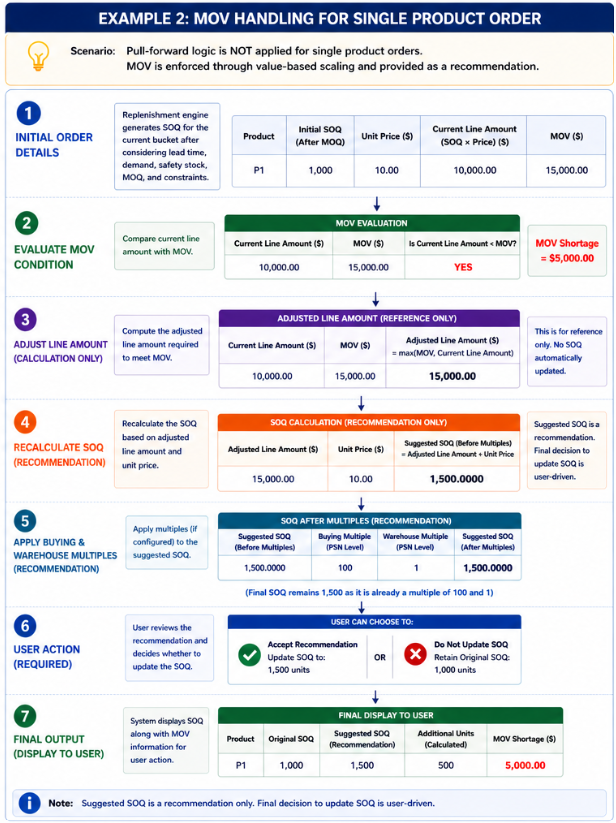
When the proposed order contains only a single product (product-level order), pull-forward logic is not applied. Instead, MOV is enforced similarly to Minimum Order Quantity (MOQ), by scaling the order quantity based on value.
Evaluation Logic
Current Line Amount = SOQ (after MOQ adjustment) × Unit Price
Compare the current line amount with the configured MOV
Adjusted Line Amount = max(MOV, Current Line Amount)
Final SOQ = Adjusted Line Amount ÷ Unit Price
Apply buying multiples and warehouse multiples if configured
Behavior
Pull-forward logic is not used
The system increases the order quantity until the total value meets or exceeds the MOV
This behavior is analogous to MOQ enforcement, but based on value rather than quantity
Example 2: MOV Enforcement (Single Product Order)
Was this article helpful?
That’s Great!
Thank you for your feedback
Sorry! We couldn't be helpful
Thank you for your feedback
Feedback sent
We appreciate your effort and will try to fix the article