TABLE OF CONTENTS
2. Forecast Generation
2.1 When Is_Discontinued = Yes, the forecasting engine:
2.2 Forecast generation at aggregate level when Is_Discontinued = Yes
2.3 Discontinued Items in Forecast Filter Results
3. Discontinued Items in Planning Views
4. Time-Series Editing and Overrides
4.1 Aggregation Behavior
4.2 Disaggregation Behavior
5. Data Load Behavior
5.1 Master Data
5.2 Transaction Data
5.3 Loaded Measures and Time-Series Data
6. EOL Date
1. Overview
The Is_Discontinued feature identifies planning items that are no longer active for applicable forecasting and planning activities.
The discontinuation status can apply to different master data entities, including:
- Product
- Customer
- Location
- Source
The Business App automatically considers the configured Is_Discontinued status while performing applicable forecasting, planning, override, and disaggregation activities.
2. Forecast Generation
The forecasting engine automatically checks the Is_Discontinued status when generating a forecast.
2.1 When Is_Discontinued = Yes, the forecasting engine:
- Excludes the item from forecast generation.
- Does not generate forecast values for the item across the forecast horizon.
- Returns an empty forecast for the discontinued item.
When Is_Discontinued = Yes, it takes precedence over EOL Date.
- The EOL Date does not influence this forecast-generation behavior once Is_Discontinued = Yes, even if the EOL Date is in the future.
- When Is_Discontinued = Yes, the item is excluded from the entire forecast horizon irrespective of the EOL Date.
2.2 Forecast generation at aggregate level when Is_Discontinued = Yes
This behavior also applies when you create a forecast at an aggregate hierarchy level. For example, when you create a forecast at the Sub-Family level, and the Sub-Family contains both active and discontinued products, the forecasting engine excludes the discontinued products and generates forecasts only for eligible active products.
2.3 Discontinued Items in Forecast Filter Results
When you select filter criteria while creating a forecast, the filter results identify discontinued items.
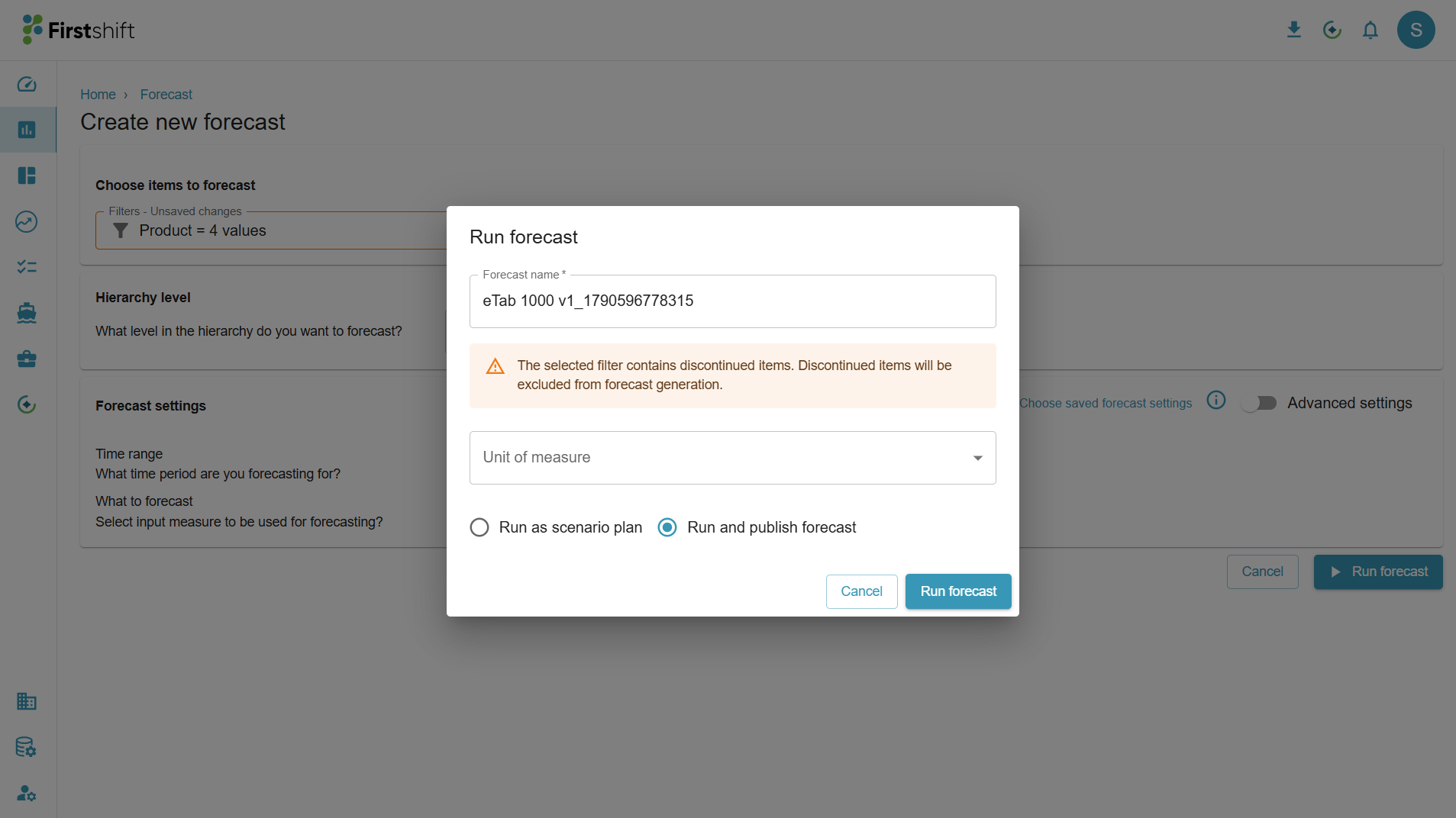
- Items where Is_Discontinued = Yes remain visible in the filter results with a discontinued indicator.
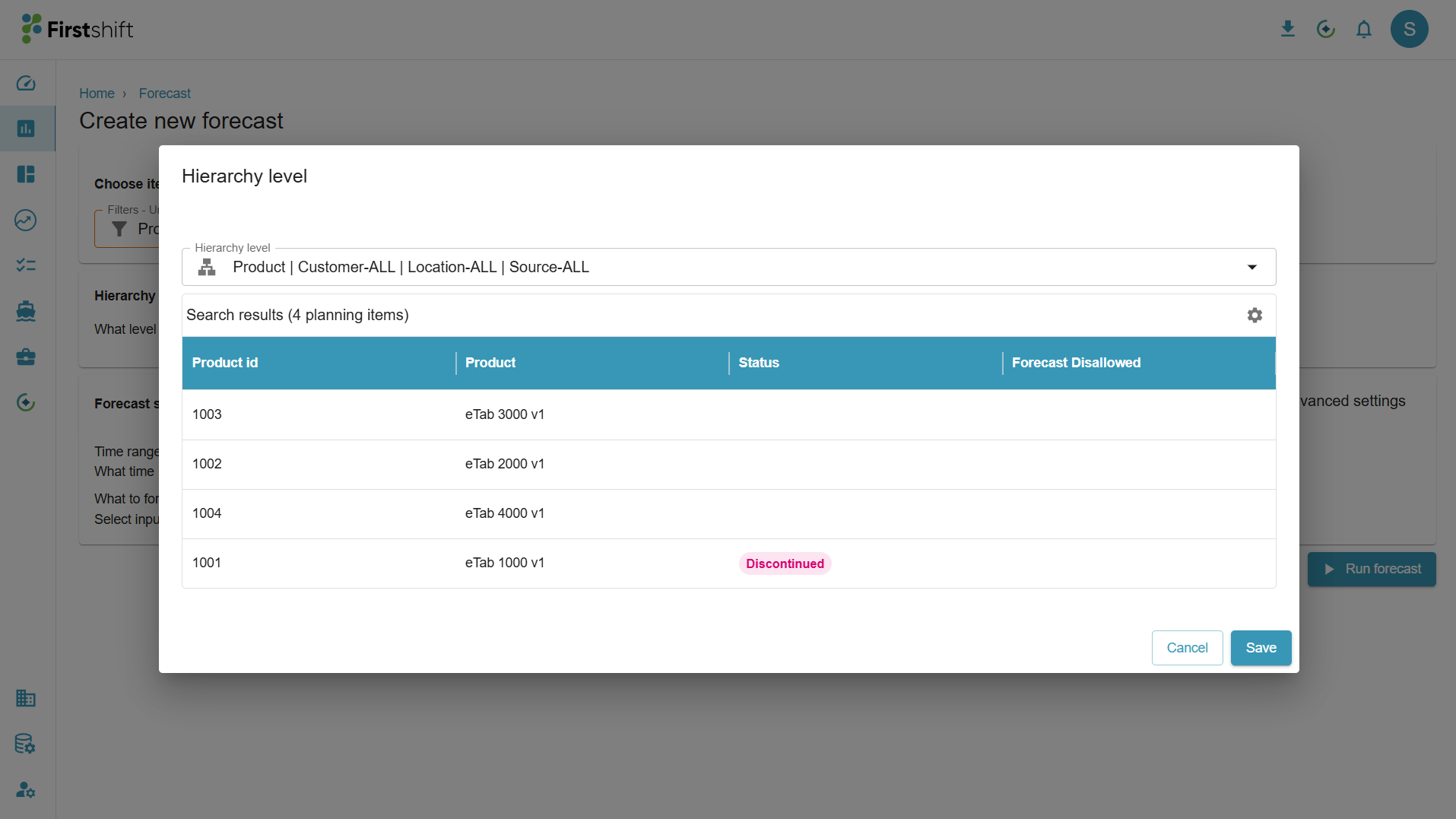
- When the filter contains both active and discontinued items, the application displays a message indicating that discontinued items are excluded from forecast generation.
- You can continue creating the forecast, and the forecasting engine generates forecasts only for eligible active items.
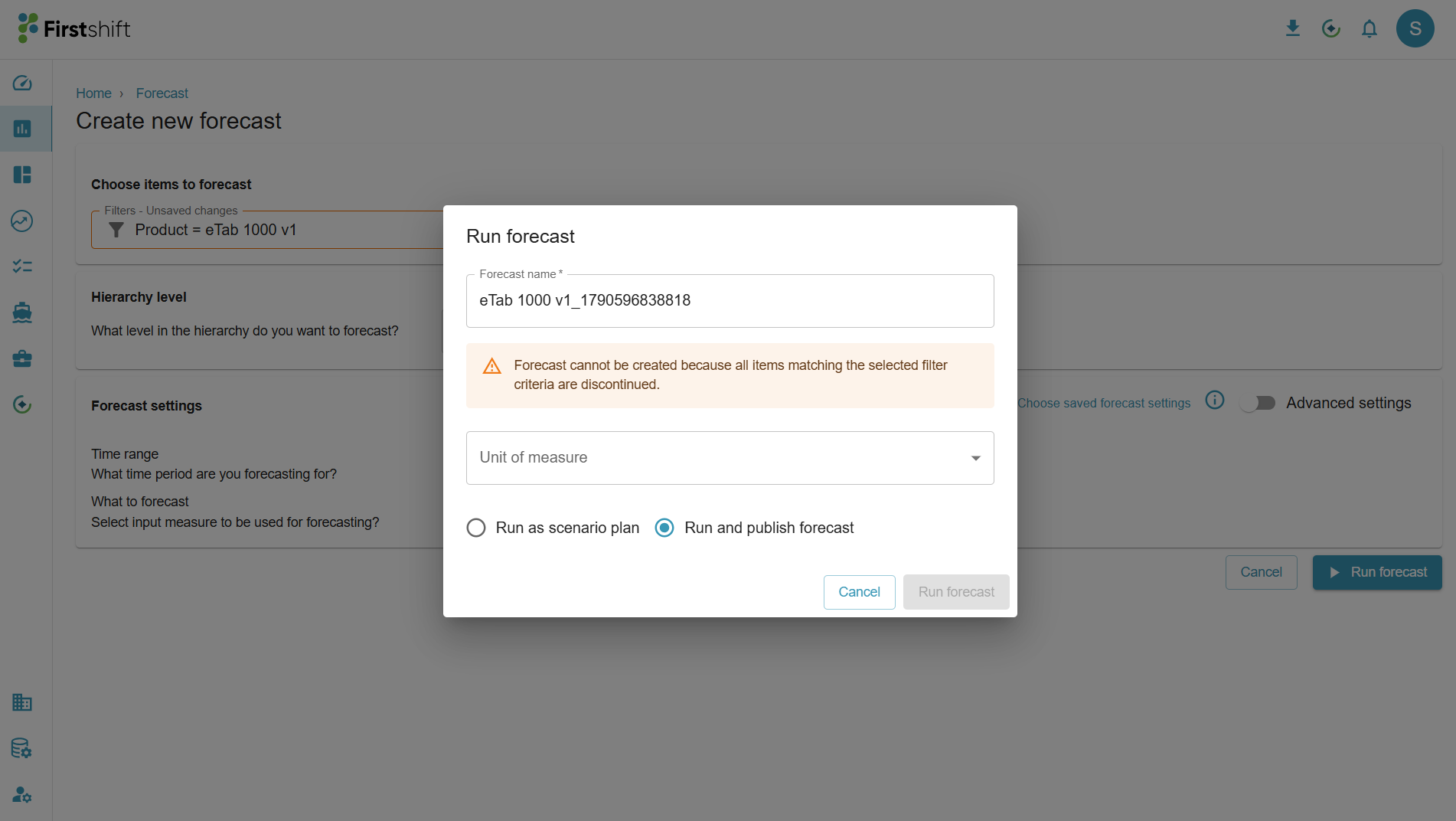
If all items returned by the selected filter criteria are discontinued:
- The application prevents forecast creation.
- The forecast cannot be submitted because there are no eligible active items for forecast generation.
3. Discontinued Items in Planning Views
By default, Planning Views will not display discontinued items in the Planning View results screen. The application automatically excludes all discontinued items from display in the Planning View results screen.
4. Time-Series Editing and Overrides
The application uses the Is_Discontinued status and EOL Date to determine whether time-series values are editable.
When Is_Discontinued = Yes and EOL Date = Null or Not Null
- The item is considered discontinued across the planning horizon.
- Time-series values are not editable.
- Overrides are not available for the item across the horizon irrespective of EOL Date. This is because Is_Discontinued takes precedence over EOL Date
When Is_Discontinued = No and an EOL Date exists:
- Time-series values remain editable through the applicable EOL period.
- Periods after the EOL Date are not editable.
- These restrictions apply to applicable individual and bulk override functionality.
4.1 Aggregation Behavior
Existing values associated with discontinued items will be excluded from the aggregate results.
Note: The application does not automatically remove existing values simply because an item is discontinued or has crossed its EOL Date. This keeps existing information available for reference.
However, discontinued items do not receive new values through overrides at aggregate levels and disaggregation operations.
4.2 Disaggregation Behavior
The application evaluates the discontinuation status and EOL Date before updating lower-level records during disaggregation.
Is_Discontinued = Yes
- The item is excluded from updates through disaggregation across the entire horizon irrespective of the EOL Date.
- Existing values remain unchanged.
Is_Discontinued = No and an EOL Date exists
- The item participates in disaggregation through the applicable EOL period.
- The application does not update the item after the EOL Date.
- Existing post-EOL values remain unchanged.
The disaggregation process does not automatically zero out, clear, or overwrite existing values for an ineligible discontinued item. It leaves those values unchanged.
5. Data Load Behavior for Discontinuation items
The Is_Discontinued status and EOL Date do not restrict data loading.
The application continues to accept data associated with discontinued items. This allows historical information and other business data to be maintained or corrected even after an item is discontinued.
5.1 Master Data
Master data for discontinued items remains loadable and editable. This includes:
- Product
- Customer
- Location
- Source
The Is_Discontinued and EOL Date values can also be maintained through the applicable master data processes.
5.2 Transaction Data
Transaction data continues to load for discontinued items. The application allows applicable historical corrections and new transaction records without rejecting them solely because an item is discontinued or has crossed its EOL Date.
5.3 Loaded Measures and Time-Series Data
Loaded measures and other supported time-series data continue to accept values for discontinued items.
Historical, current, and future-period data is not rejected solely because Is_Discontinued = Yes or an EOL Date has passed.
In summary, Is_Discontinued controls applicable forecasting and planning behavior but does not prevent the underlying business data from being loaded or maintained.
6. EOL Date
EOL Date – Business App
The EOL Date identifies the date after which a product or planning item is no longer eligible for applicable planning activities.
- Planning Horizon
- The item continues to participate in applicable planning activities up to its EOL Date.
- Periods after the EOL Date are treated as ineligible planning periods. This means the application doesn’t generate any forecast after the EOL Date. However, the previous forecast values continue to exist
- The EOL Date applies at the level where it is configured, such as Product, Product-Customer, Product-Location, or another supported combination.
- Time-Series Editing(Overrides)
- Time-series values remain editable up to the applicable EOL Date.
- Periods after the EOL Date are read-only.
- The planner cannot enter new overrides or modify existing values for post-EOL periods.
- Aggregation
- An item participates in aggregation only for periods that are within its applicable EOL Date.
- For any period after the EOL Date, the item's value is excluded from the aggregation calculation.
- Even if the item contains an existing time-series value after the EOL Date, the application does not include that value when calculating the aggregate value.
- The existing lower-level value can remain unchanged, but it does not contribute to the parent-level total.
- Example:
- Product B has an EOL Date of October 1, 2026.
- Product B contains a value of 100 units for October 2026.
- When the application calculates the October value at the Sub-Family level, the 100 units from Product B are excluded from the aggregation.
- The Sub-Family total includes values only from the other eligible items for that period.
- Disaggregation
- The item participates in disaggregation up to the applicable EOL Date.
- After the EOL Date, the application excludes the item from disaggregation updates.
- Existing post-EOL values remain unchanged.
- The application does not clear, zero out, or overwrite existing post-EOL values during disaggregation.
- Example
- A product has an EOL Date of August 31, 2026.
- The product participates in applicable planning and disaggregation activities through August 2026.
- From September 2026 onward:
- The planner cannot override its time-series values.
- The product does not receive new values through disaggregation.
- Any values that already exist for September or later remain unchanged.
- Data Maintenance
- The EOL Date does not prevent data from being loaded or maintained.
- Master data, transaction data, and loaded measures continue to accept applicable records even after the EOL Date.
- This allows historical corrections and other required data maintenance without changing the item's EOL Date.
Note: The EOL Date controls applicable period-based planning behavior. Forecast generation based on Is Discontinued follows its own discontinuation behavior and does not use the EOL Date to determine the forecast horizon.
Was this article helpful?
That’s Great!
Thank you for your feedback
Sorry! We couldn't be helpful
Thank you for your feedback
Feedback sent
We appreciate your effort and will try to fix the article