TABLE OF CONTENTS
- Scenario 1: Lock applied at the Intermediate Level
- Scenario 2: Lock applied at the Intermediate Level and the Lower Level of another intermediate item
- Scenario 3: Override value at the aggregate level is less than the locked item value
- Scenario 4: When a parent is locked, but one of the children is unlocked.
Scenario 1: Lock applied at the Intermediate Level
Consider the following hierarchy setup:
Aggregate Level: Family: All: All: All
Intermediate Level: Product: Region: All: All
Detailed Level: Product: Customer: Location: All
Example Context
At the family level, assume the family named ‘eTablets’ had the Sales Manager Units = 1,000 units for the current month.
In the current period, one of the relations at the intermediate level has been locked.
For example:
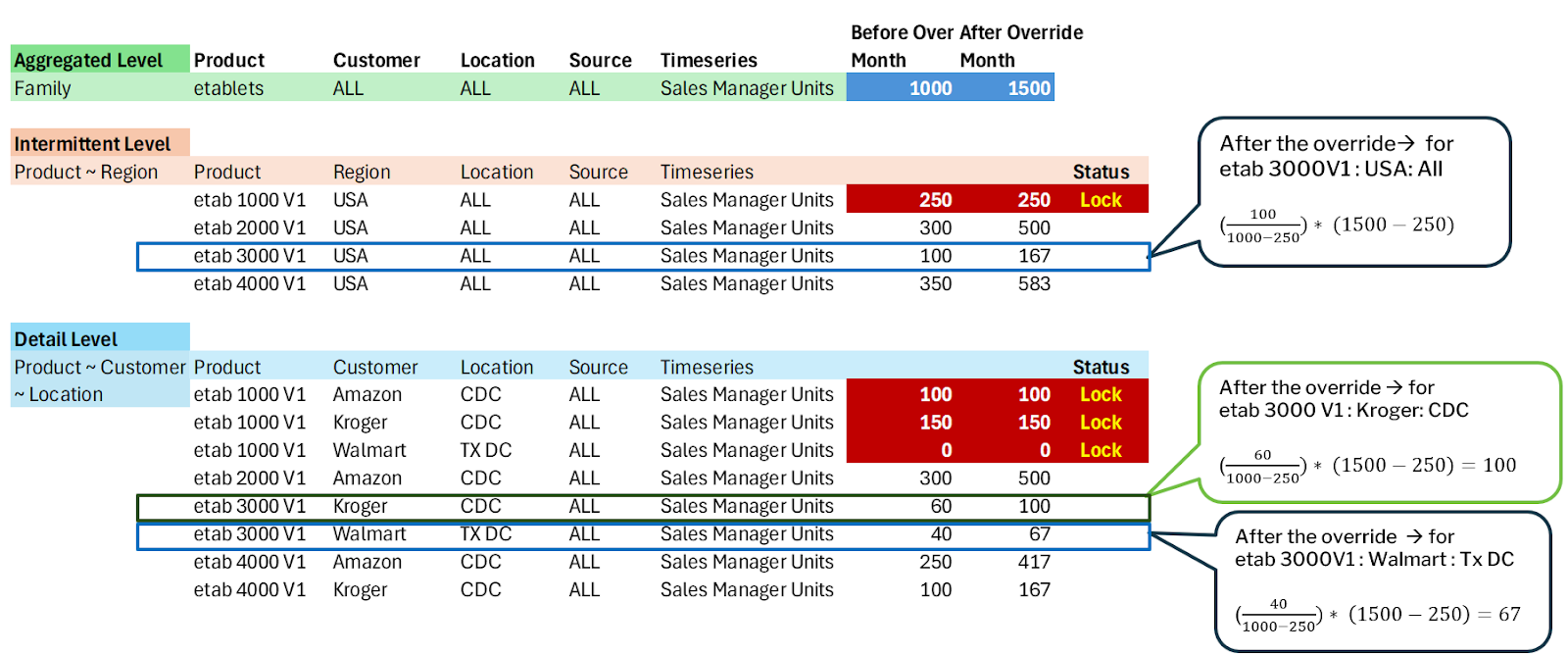
The intermediate item - eTab 1000 v1: USA: All: All - is locked for Sales Manager Units.
All other intermediate items remain unlocked.
Override Scenario
Now, suppose you perform an override at the family level (eTablets) — changing Sales Manager Units from 1,000 units → 1,500 units.
When this happens:
The disaggregation logic is applied to distribute the delta (change of +500 units).
However, since eTab 1000 v1: USA: All: All is locked, its value remains unchanged.
Consequently, all detailed-level combinations under that locked relation (eTab 1000 v1 → Customer & Location combinations) also remain unchanged.
Unlocked Relations Example
For unlocked relations such as:
eTab 3000 v1: Kroger: CDC
eTab 3000 v1: Walmart: TX DC
The disaggregation updates their values proportionally.
Example Calculation
Let’s assume:
Previous total (family level) = 1,000 units
Locked portion = 250 units (from eTab 1000 v1)
New total (family level) = 1,500 units
Hence, the delta to distribute among unlocked items is:
Delta =(1,500)-(1,000)=500
The proportional adjustment for each unlocked relation is computed as:
New Value=(Old ValueOld Total-Locked Value)×(New Total-Locked Value)
For eTab 3000 v1: Kroger: CDC
Old Value=60New Value=60(1,000-250)×(1,500-250)New Value=60750×1,250=100
For eTab 3000 v1: Walmart: TX DC
Old Value=40New Value=40(1,000-250)×(1,500-250)New Value=40750×1,250=67
Explanation of Logic
The subtraction of 250 units from both the numerator and the denominator ensures that the locked quantities are excluded from the recalculation.
The system redistributes only the delta of 500 units among the unlocked relations, maintaining proportionality.
The locked relation (eTab 1000 v1) and its detailed-level items remain unchanged.
Aggregation back to Higher Level
After the detailed-level updates:
The top-level value for eTab 3000 v1: USA changes from 100 → 167,
Since it now aggregates the updated values:
100 (etab 3000 V1: Kroger CDC)+67 (etab 3000 V1: Walmart TX DC)=167
- Thus, the hierarchy maintains consistency — locked items remain fixed, while only unlocked items participate in the proportional disaggregation of the delta.
Scenario 2: Lock applied at the Intermediate Level and the Lower Level of another intermediate item
This example continues from the previous case and demonstrates how disaggregation behaves when locks are applied at multiple levels—one at an intermediate level and another at a detailed level.
Hierarchy Setup
Aggregate Level: Family: All: All: All
Intermediate Level: Product: Region: All: All
Detailed Level: Product: Customer: Location: All
At the family level, the product family eTablets has Sales Manager Units = 1,000 units.
Locks have been applied as follows:
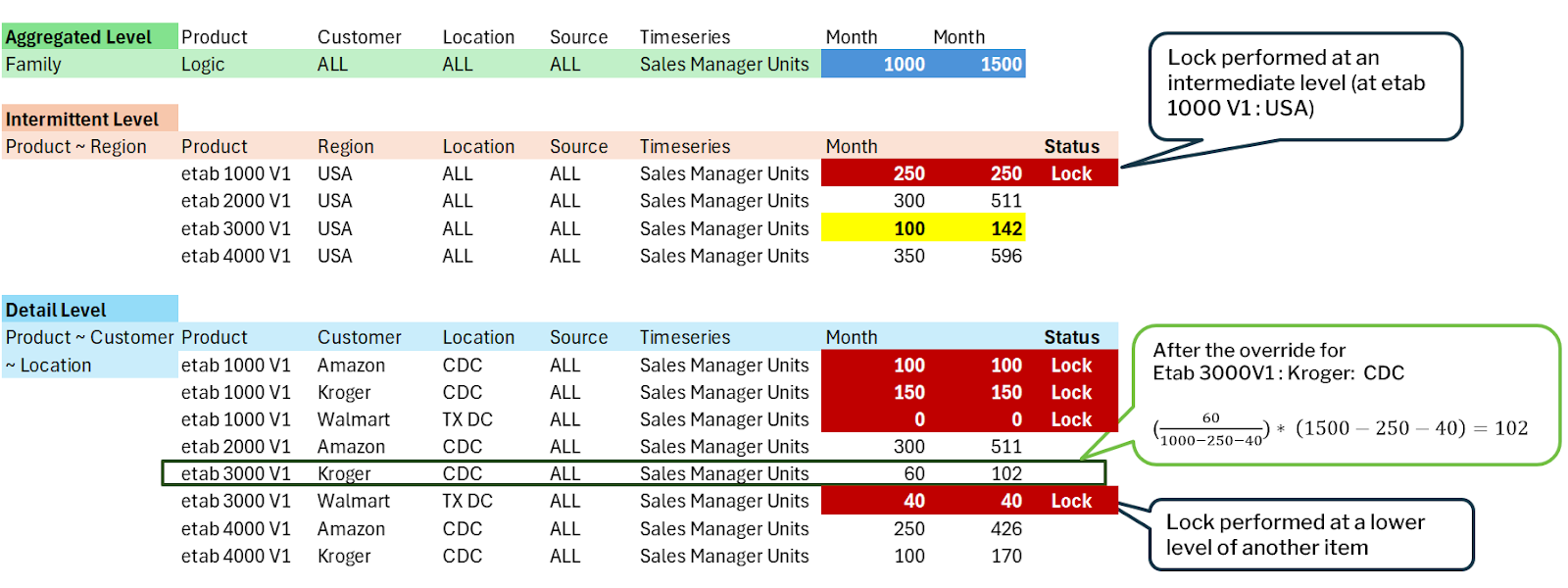
Intermediate-level lock: eTab 1000 V1: USA: All : All
Detailed-level lock: eTab 3000 V1: Walmart: Tx DC: All
Override Scenario
Now, you perform an override at the family level (eTablets), increasing Sales Manager Units from 1,000 → 1,500 units.
When this override is made:
The total delta = 1,500 − 1,000 = 500 units.
This 500-unit increase should be distributed only among unlocked items.
Locked relations at both intermediate and detailed levels remain unaffected.
Behavior of Locked Items
Intermediate Lock:
eTab 1000 V1: USA (and all detailed items under it) remain unchanged.
Their previous and new values are the same.
Detailed Lock:
eTab 3000 V1: Walmart: Tx DC remains unchanged as well.
Previous Value = 40, New Value = 40.
Disaggregation Among Unlocked Items
Now, the 500 additional units are distributed only among the remaining unlocked items: Example :
eTab 3000 V1: Kroger: CDC (unlocked item under eTab 3000 V1: USA).
Computation Formula
To exclude locked quantities from both numerator and denominator, the new value is computed as:
New Value=(Old ValueOld Total-Locked Values)×(New Total-Locked Values)
Where:
Old Total = 1,000
New Total = 1,500
Locked Values = 250 (for eTab 1000 V1: USA) + 40 (for eTab 3000 V1: Walmart: Tx DC)
Example Calculation for eTab 3000 V1: Kroger: CDC:
Old Value=60New Value=60(1,000-250-40)×(1,500-250-40)New Value=60710×1,210=102
Hence, the new value for eTab 3000 V1: Kroger: CDC increases from 60 → 102.
Aggregation to Intermediate Level
The updated intermediate-level total for eTab 3000 V1: USA is the sum of its detailed items:
eTab 3000 V1: USA=102 (Kroger CDC)+40 (Walmart Tx DC)=142
Thus, the intermediate-level total increases from 100 → 142, reflecting the distributed delta only among unlocked items.
Scenario 3: Override value at the aggregate level is less than the locked item value
This scenario extends the previous examples and demonstrates the disaggregation behavior when the overridden value at the aggregate level is less than the locked item value at an intermediate level.
Hierarchy Setup
Aggregate Level: Family: All: All: All
Intermediate Level: Product: Region: All: All
Detailed Level: Product: Customer: Location: All
For the family eTablets:
Previous total value: 1,000 units
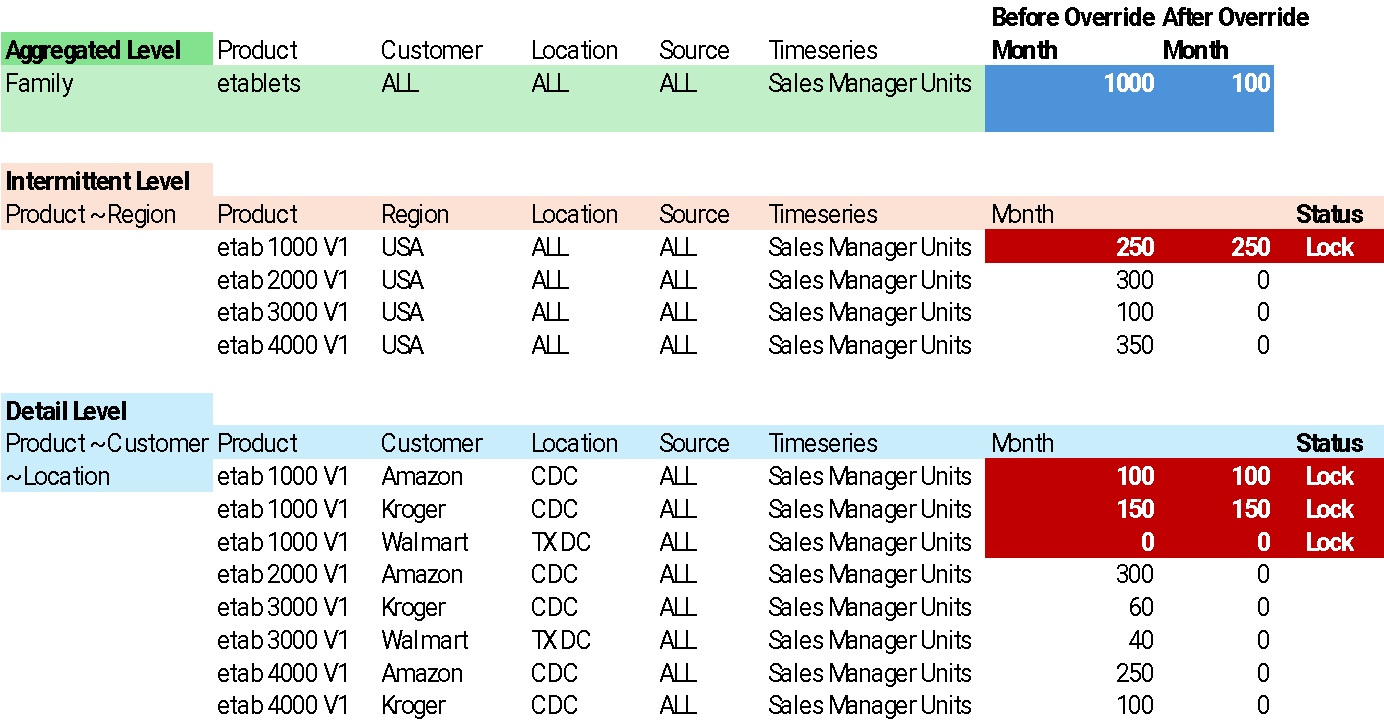
New overridden value: 100 units
A lock has been applied at the intermediate level:
eTab 1000 V1: USA: All: All (locked value = 250 units)
The intermediate item eTab 1000 V1: USA also has detailed-level items, such as:
eTab 1000 V1: Amazon: CDC = 100
eTab 1000 V1: Kroger: CDC = 150
eTab 1000 V1: Walmart: Tx DC = 0
These detailed items are considered children of the locked intermediate item and therefore inherit the lock status.
Override Scenario
When you override the family-level value (eTablets) from 1,000 → 100 units:
The system first calculates the total change (delta) = 100 − 1,000 = −900 units.
However, since the locked intermediate item (eTa 1000 V1: USA) already holds 250 units, which is greater than the new overridden total (100), the system cannot proportionally reduce locked values.
System Behavior
Locked Items Remain Unchanged:
The locked intermediate item (eTab 1000 V1: USA) and all its detailed-level children (Amazon CDC, Kroger CDC, Walmart TX DC) retain their previous values:
eTab 1000 V1: USA = 250
eTab 1000 V1: Amazon: CDC = 100
eTab 1000 V1: Kroger: CDC = 150
eTab 1000 V1: Walmart: Tx DC = 0
Unlocked Items Become Zero:
Since the new overridden total (100) is less than the locked value, the system cannot proportionally reduce or redistribute values among the remaining unlocked items.
Therefore, all unlocked items are adjusted to 0, as there is no remaining quantity to allocate after respecting the lock.
Key Takeaways
When the overridden total is less than a locked item’s value, the system preserves all locked quantities and their lower-level distributions.
Locked items are never reduced or altered, even if they exceed the new aggregate total.
Any remaining unlocked items are adjusted to zero, as the locked values already consume the overridden total.
Scenario 4: When a parent is locked, but one of the children is unlocked.
This scenario extends the previous examples and explains the behavior when you unlock one of the lower-level (detailed) items that were previously part of a locked intermediate item.
Hierarchy Setup
Aggregate Level: Family: All: All: All
Intermediate Level: Product: Region: All: All
Detailed Level: Product: Customer: Location: All
For the family eTablets:
Previous total value: 1,000 units
Intermediate item: eTab 1000 V1: USA was locked with a total value of 250 units.
Its detailed-level breakdown was:
eTab 1000 V1: Amazon: CDC → 100 (Locked)
eTab 1000 V1: Kroger: CDC → 150 (Locked)
eTab 1000 V1: Walmart: Tx DC → 0 (Locked)
Unlock Action
You now unlock one of the detailed-level items, specifically:
eTab 1000 V1: Kroger: CDC
Once this child item is unlocked:
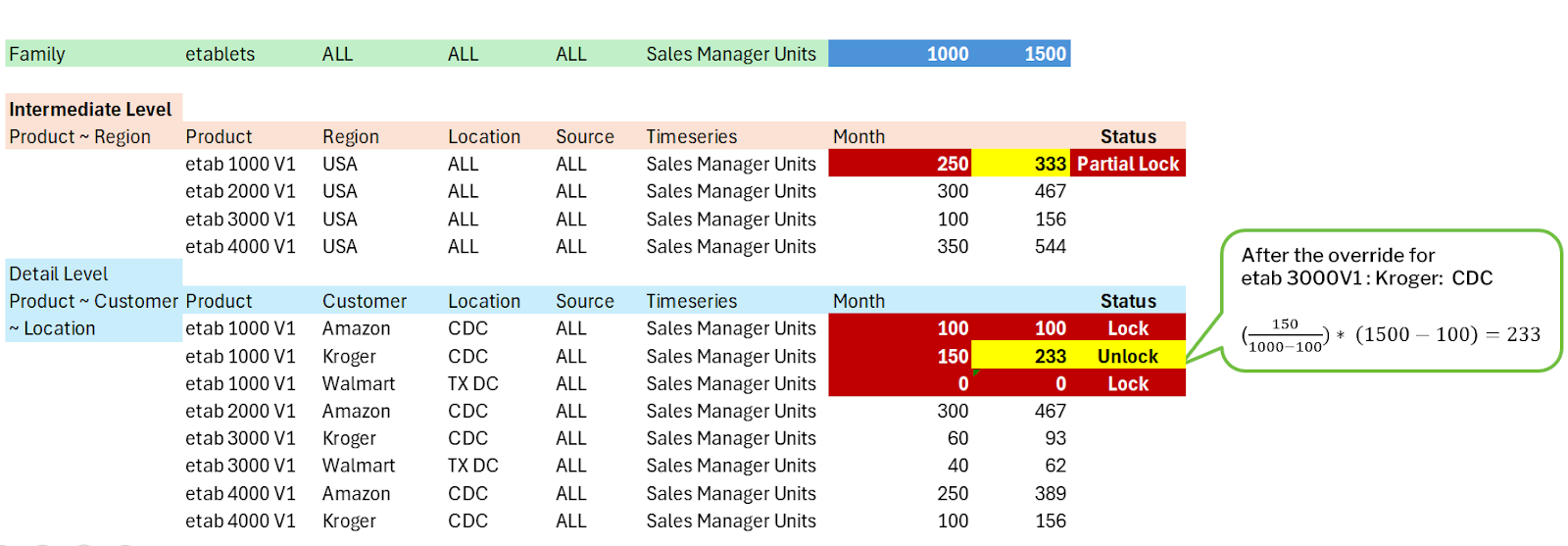
The intermediate parent (eTab 1000 V1: USA) automatically transitions to a partial lock state.
This means you can now modify both the intermediate parent (eTab 1000 V1: USA) and the newly unlocked child (eTab 1000 V1: Kroger: CDC).
The other detailed-level children (Amazon CDC and Walmart Tx DC) remain locked.
Override Scenario
You perform an override at the family level (eTablets), changing Sales Manager Units from 1,000 → 1,500 units.
Delta: 500 units
Locked items: Unaffected (values remain the same)
Unlocked items: Participate in disaggregation
Impact on Items
Locked Items (No Change):
eTab 1000 V1: Amazon: CDC = 100 (Locked)
eTab 1000 V1: Walmart: Tx DC = 0 (Locked)
Unlocked Item (Updated):
eTab 1000 V1: Kroger: CDC
New Value=150(1,000-100)×(1,500-100)New Value=150900×1,400=233
So, the new value for Kroger CDC becomes 233 units.
Intermediate Level (Updated):
The updated value for eTab 1000 V1: USA is the sum of its child items:
100 (Amazon)+233 (Kroger)+0 (Walmart)=333
Hence, the new value for eTab 1000 V1: USA = 333 units.
Key Takeaways
Unlocking a detailed-level item under a locked parent changes the parent’s state to partial lock.
Both the parent and the unlocked child become editable.
Locked child items remain unaffected during disaggregation.
The delta (500 units) is redistributed proportionally among only the unlocked items.
Aggregation ensures the parent and family levels reflect the updated total correctly.
Was this article helpful?
That’s Great!
Thank you for your feedback
Sorry! We couldn't be helpful
Thank you for your feedback
Feedback sent
We appreciate your effort and will try to fix the article